Signator: The Playful Handwritten Font That Elevates Your Designs
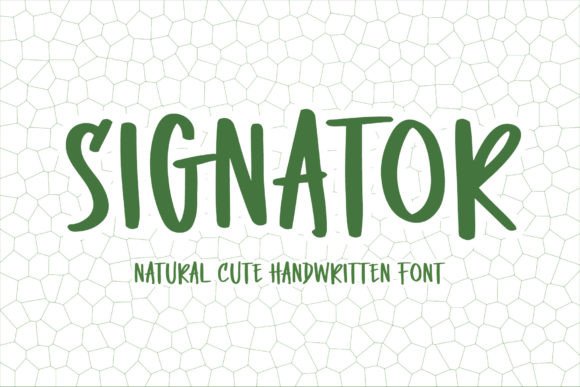
In the crowded landscape of digital typography, finding a typeface that genuinely captures a human touch without looking messy is a rare victory. Signator stands out as a solution for designers seeking that specific blend of cuteness and modernity. It is not merely a font; it is a visual voice characterized by its bouncy, handwritten style. When you apply Signator to a project, you are injecting a sense of fun and playfulness that rigid sans-serifs simply cannot achieve. Whether you are crafting back-to-school flyers, designing birthday invitations, or creating Valentine's Day quotes, this font offers a friendly aesthetic that resonates immediately with your audience.
However, the charm of a playful font like Signator often leads creators into a trap of overuse or misapplication. Many beginners assume that because a font looks "cute," it can be used anywhere to add personality. This assumption frequently results in designs that feel juvenile, cluttered, or difficult to read. To truly leverage the potential of Signator, you must understand its limitations just as well as its strengths. The difference between a professional-grade design and an amateur one often lies in how carefully you deploy these expressive elements.
Understanding the True Nature of Signator
Before integrating Signator into your workflow, it is essential to define exactly what makes it unique. It is a handwriting-style typeface designed to mimic the natural flow of a pen on paper, but with a deliberate, polished bounce. This "bounciness" creates a rhythm that feels energetic and optimistic. It is ideal for projects where the goal is to evoke warmth, creativity, or celebration. Think of planners, stickers, scrapbooking layouts, and social media graphics where the primary emotion should be joy or excitement.
The appeal of Signator extends beyond simple decoration. In marketing, a handwritten font can significantly increase engagement by making a brand feel more approachable and personal. For entrepreneurs and small business owners, using a font like this can bridge the gap between a corporate entity and a community member. However, this power comes with responsibility. If the context does not match the tone of the font, the message becomes confusing rather than compelling.
Common Mistakes When Using Playful Typography
Even experienced designers sometimes stumble when working with expressive fonts. The most frequent error is treating Signator as a body text font for long paragraphs. Because of its irregular letterforms and varying stroke widths, reading large blocks of text in this style causes eye strain. The brain works harder to decode each character, leading to reader fatigue. If you use Signator for a blog post or a detailed event schedule, you risk losing your audience before they even reach the core information.
Another overlooked detail is the lack of contrast. Designers often pair Signator with other decorative or script fonts, assuming that "more cute equals better." This creates a visual cacophony where no single element stands out. When everything is bouncing and whimsical, nothing commands attention. A common result is a design that feels chaotic and unprofessional, undermining the very credibility you are trying to build.
Furthermore, many users neglect the importance of spacing and kerning. Handwritten fonts often have tight default spacing, which can look cramped when scaled up for headlines or banners. Without manual adjustment, letters may overlap awkwardly, making the text illegible. Conversely, too much space can break the natural flow of the handwriting, making it look disjointed. These subtle technical errors can ruin the presentation of an otherwise beautiful design.
How Poor Choices Impact Your Results
The consequences of misusing Signator go beyond aesthetics. Ineffective typography directly impacts communication efficiency. If a customer struggles to read a coupon code or a date on an invitation because the font is too dense or poorly spaced, they may simply abandon the interaction. For educators and planners, clarity is paramount; a confusing layout can lead to missed deadlines or misunderstandings.
Additionally, poor font choices can damage brand perception. While a playful font is great for a children's party or a craft shop, using it for a legal notice or a financial report signals a lack of seriousness. It suggests that the creator did not consider the audience's expectations. In the digital age, where first impressions happen in milliseconds, a mismatched font can cause potential clients to question your professionalism instantly.
Practical Strategies for Better Design Decisions
To avoid these pitfalls, adopt a strategy of restraint and intentionality. The golden rule for using Signator is to reserve it for short, impactful text. Use it for headlines, pull quotes, logos, or key call-to-action buttons. For the main body of your content, pair it with a clean, neutral sans-serif or a highly legible serif font. This combination allows the playful nature of Signator to shine as an accent while ensuring the rest of your message remains clear and accessible.
Consider the hierarchy of your design. If Signator is your headline, ensure the supporting text is significantly smaller and less decorative. This creates a visual path for the reader's eye, guiding them from the fun hook to the necessary details. For example, on a birthday invitation, use Signator for "Join Us for a Party!" but switch to a standard font for the time, location, and RSVP instructions.
Always test your design at different sizes. What looks charming on a desktop monitor might become a blur on a mobile screen. Check how the fine lines and curves of Signator render on various devices. If the details disappear when scaled down, you may need to adjust the weight or choose a different variant of the font family. Legibility across platforms is non-negotiable for modern digital assets.
Evaluating Signator Before You Commit
Before downloading or purchasing Signator, take the time to evaluate its compatibility with your specific project needs. First, check the character set. Does it include all the ligatures, numbers, and symbols you require? Some handwritten fonts lack certain special characters or have inconsistent numbering styles that clash with the main alphabet. Ensure the font supports the language and symbols relevant to your audience.
Next, review the licensing terms carefully. Are you allowed to use it for commercial projects like merchandise, advertisements, or client work? Some free versions of fonts restrict usage to personal projects only. Using a font commercially without the proper license can lead to legal issues and unexpected costs down the line. Always verify that your intended use aligns with the creator's license agreement.
Finally, trust your instinct regarding the "vibe." Does Signator actually fit the mood you want to convey? If your brand is minimalist and sleek, a bouncy font might feel out of place. If your goal is to sell high-end luxury goods, a playful script might undermine the perceived value. Take a step back and ask if the font serves the message or distracts from it.
Real-World Applications Done Right
When applied correctly, Signator transforms ordinary designs into memorable experiences. Imagine a back-to-school planner cover where the title "My School Year" pops in Signator, inviting students to engage with their organization tools. Or consider a local bakery's social media post announcing a new cupcake flavor; the handwritten style mimics the chalkboard menu feel, evoking a sense of homemade quality and warmth.
For Valentine's Day cards, Signator adds a personal touch that printed block letters cannot replicate. It feels like a note written by hand, increasing the emotional impact of the message. Similarly, for sticker packs and crafting supplies, the font's playful energy matches the creative spirit of the hobbyist. By limiting its use to these specific, high-impact areas, you maximize its effectiveness without overwhelming the viewer.
Ultimately, Signator is a powerful tool in the designer's toolkit, but like any tool, it requires skill to wield effectively. By understanding its strengths, avoiding common traps, and pairing it thoughtfully with other elements, you can create designs that are not only visually appealing but also functionally sound. Remember, the best design choices are those that enhance communication, not complicate it. With careful consideration, Signator can bring the perfect dose of fun and modernity to your next creative endeavor.