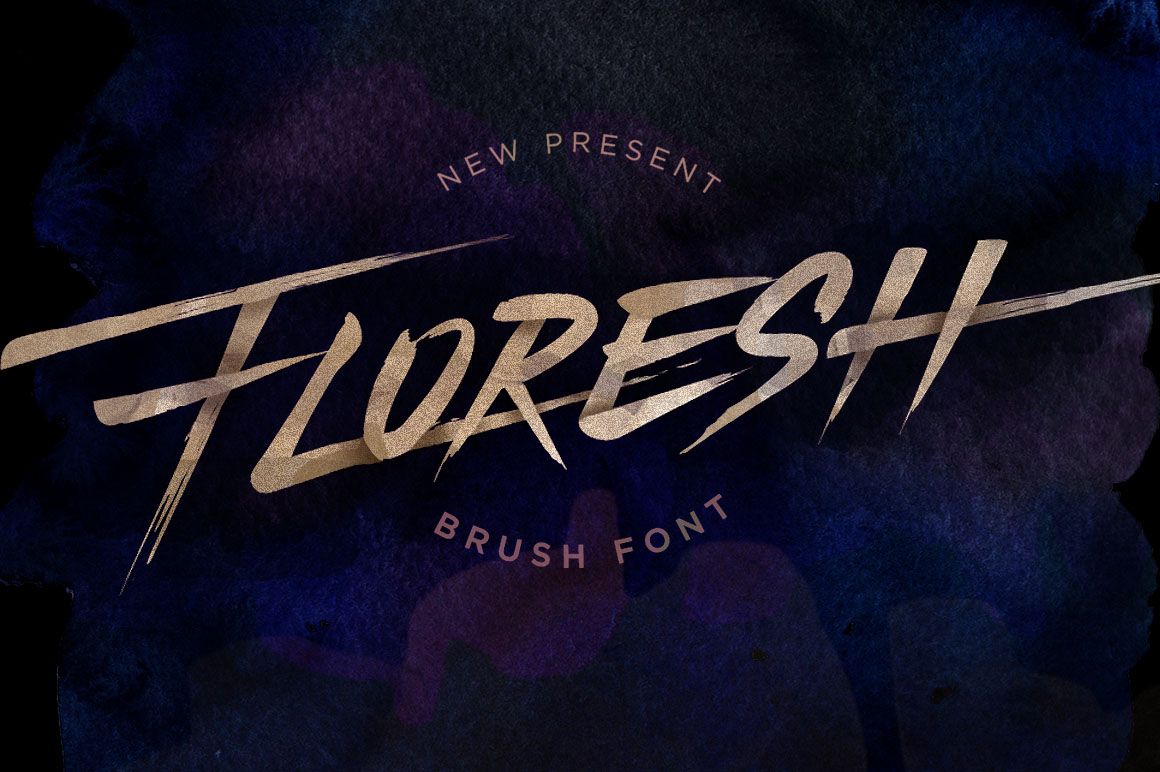
Why Floresh Is the Hand-Brushed Typeface Your Designs Have Been Missing
There is a distinct difference between typography that merely fills space and lettering that captures attention. In the crowded digital landscape, brands and creators are constantly searching for ways to humanize their visual communication. This is where Floresh enters the conversation. As a hand-brushed typeface, it is meticulously designed to replicate the organic flow of custom hand-lettering without the hours of manual drawing. However, simply downloading a beautiful font is not enough to guarantee professional results. Many designers, marketers, and small business owners stumble not because the tool is flawed, but because they misunderstand how to wield it effectively.
Understanding the nuances of brush scripts can save you from common pitfalls that dilute brand authority and reduce readability. By recognizing these subtle errors early, you can elevate your projects from amateur attempts to polished, high-impact designs.
The Misconception of "Instant" Custom Lettering
One of the most frequent mistakes users make when adopting Floresh is treating it like a standard sans-serif or serif font. Because it mimics hand-lettering, there is a temptation to type out long paragraphs or complex sentences, expecting the same legibility as a body text font. This approach often leads to visual clutter. Brush fonts thrive in display settings—headlines, logos, and short emphatic phrases. When stretched across large blocks of text, the intricate strokes and varying thicknesses can become difficult to read, causing eye strain for your audience.
Better Approach: Reserve Floresh for elements that need to pop. Use it for hero headers on websites, product packaging titles, or social media graphics where the word count is low. For supporting information, pair it with a clean, neutral sans-serif font. This contrast ensures that the artistic flair of the brush strokes remains the focal point without compromising overall usability.
Ignoring the Power of Ligatures and Alternates
A critical oversight among beginners is failing to utilize the full character set included in premium typefaces like Floresh. Standard typing produces uniform connections between letters, which can look robotic and defeat the purpose of choosing a hand-brushed style. Many users do not realize that modern OpenType features allow for contextual alternates and ligatures—special character combinations that mimic the natural way a hand moves from one letter to the next.
If you ignore these features, your design may look disjointed. The gaps between certain letter pairs might appear awkward, breaking the illusion of continuous brush movement. This affects the perceived quality of your work, making it look like a default computer output rather than a crafted piece of art.
- Check your software settings: Ensure that OpenType features are enabled in your design program.
- Experiment with alternates: Try different versions of specific letters to find the most fluid connection.
- Manual adjustment: Sometimes, even with ligatures, minor kerning adjustments are necessary to perfect the flow.
Overlooking Color and Background Contrast
Another area where designers often miss the mark is color application. Because Floresh features delicate, tapered ends and varying stroke widths, it can easily get lost against busy backgrounds or low-contrast color palettes. A common error is placing light-colored brush text over a textured or multi-colored image without adding a shadow or overlay. The fine details of the brush strokes disappear, rendering the message invisible.
This mistake directly impacts communication efficiency. If your audience has to squint to read your headline, they are likely to scroll past your content. The elegance of the font is wasted if it is not visible.
To avoid this, always test your typography against various backgrounds. Use solid colors or subtle gradients that provide ample contrast. If you must use a complex background, consider adding a semi-transparent shape behind the text or applying a subtle drop shadow to lift the letters off the page. Remember, clarity should never be sacrificed for aesthetics.
Neglecting Scale and Hierarchy
Scale is everything in typography. A frequent misunderstanding is using Floresh at too small a size. The beauty of hand-brushed fonts lies in their texture and the variation in line weight. When shrunk down for footnotes or secondary details, these details merge into blobs, losing their charm and legibility. Conversely, using it too large without adjusting spacing can make the letters feel cramped and heavy.
Practical Advice: Always view your design at the actual size it will be consumed. If it is for a mobile screen, zoom in to simulate the user experience. If the strokes look muddy or indistinct, increase the size or switch to a simpler font for that specific element. Hierarchy guides the eye; let Floresh lead, but do not let it shout so loudly that it drowns out the rest of your message.
Choosing the Wrong License for Commercial Use
For entrepreneurs and freelancers, the legal aspect of font usage is often an afterthought until it is too late. Downloading a free version of a similar font or misinterpreting the license terms of Floresh can lead to significant legal and financial repercussions. Many users assume that purchasing a font for personal use grants them the right to use it in client logos or merchandise. This is rarely the case.
Using a font improperly can result in cease-and-desist letters, fines, and the costly need to rebrand. It undermines the professionalism of your business and erodes trust with clients who expect you to handle intellectual property rights correctly.
- Read the EULA: Always review the End User License Agreement before downloading or buying.
- Distinguish between personal and commercial: Know the difference between using a font for a hobby blog versus a paid client project.
- Consider extended licenses: If you plan to use Floresh on products for sale, such as t-shirts or mugs, ensure you have the appropriate extended license.
Failing to Pair with Complementary Styles
Finally, a subtle but impactful mistake is poor font pairing. Floresh has a strong personality—organic, fluid, and expressive. Pairing it with another decorative or handwritten font creates visual conflict. The design becomes chaotic, and the viewer does not know where to look. This lack of harmony reduces the overall aesthetic appeal and can make a brand appear unfocused.
Instead, seek balance. Pair the organic curves of Floresh with structured, geometric sans-serifs or classic serifs. The rigidity of the secondary font anchors the design, allowing the brush script to shine as the accent. This combination creates a sophisticated look that feels both modern and timeless. Before finalizing your design, step back and ask if the fonts are working together or competing for attention. The goal is cohesion, not competition.
By avoiding these common pitfalls, you unlock the true potential of Floresh. It is not just a font; it is a tool for storytelling. When used with intention, respect for its characteristics, and attention to detail, it transforms ordinary designs into memorable visual experiences. Take the time to learn its quirks, respect its limitations, and apply it strategically. Your audience will notice the difference, and your work will stand out in a sea of generic typography.