Little You: The Handwritten Font That Brings Personality to Your Design
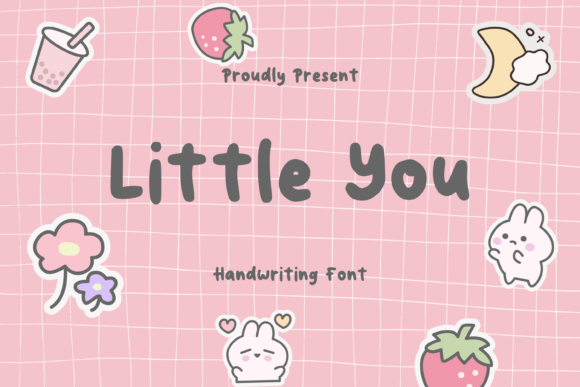
In a digital landscape dominated by rigid sans-serifs and overly polished typefaces, there is a distinct charm in finding something that feels human. Little You captures this essence perfectly. It is a cute handwritten font designed to mimic the natural flow of someone writing with a pen. The letters are round, approachable, and easy to read, offering a playful and friendly vibe that instantly warms up any project. Whether you are designing birthday cards, wedding invitations, or branding materials for a small business, Little You adds a personal touch that standard fonts simply cannot replicate.
However, selecting a script or handwriting-style font requires more than just liking how it looks at first glance. Many creators make the mistake of assuming that because a font looks "cute," it will work everywhere. This oversight can lead to designs that feel cluttered, difficult to read, or tonally mismatched. To truly leverage the potential of Little You, you need to understand not just its aesthetic appeal, but also its limitations and the best practices for applying it effectively.
Understanding the Versatility and Limits of Little You
The primary reason people are drawn to Little You is its ability to inject warmth into communication. In marketing and design, this emotional connection is vital. When a customer sees an invitation written in a font that resembles a friend's note, they feel invited rather than targeted. For educators creating worksheets for young children, the rounded edges of the characters reduce visual stress and make learning feel less intimidating. For entrepreneurs launching a lifestyle brand, it signals authenticity.
Yet, the very features that make Little You charming—its irregularity and rounded forms—are also where many users stumble. A common misunderstanding is treating a handwritten font exactly like a geometric sans-serif. Because the letters vary in width and height, aligning them in large blocks of text can create uneven baselines and distracting gaps. If you use Little You for a long paragraph of body copy without adjusting your spacing, the result can be exhausting to read. The eye struggles to track the line, leading to poor user experience and reduced engagement.
Avoiding Common Typography Mistakes
One of the most frequent errors I see designers and beginners make is overusing script fonts. There is a tendency to think that if a little bit of personality is good, a lot must be better. Consequently, entire websites or documents are sometimes set in Little You from header to footer. This creates visual noise. The brain works harder to decode the text, which increases cognitive load. Instead of feeling "friendly," the content starts to feel chaotic and unprofessional.
Another critical mistake involves neglecting legibility in small sizes. While Little You is described as easy to read, its intricate curves and loops can vanish when scaled down. Using this font for fine print, legal disclaimers, or navigation menus on mobile devices is a recipe for frustration. If your audience has to squint or zoom in to read the terms of service, you have failed in your communication goal. The charm of the font is lost when it becomes illegible.
Furthermore, color contrast is often overlooked when using light, playful fonts. Little You works beautifully in soft pastels or warm tones, but placing thin, light-colored strokes against a similarly light background renders the text invisible. This is particularly risky for accessibility. Users with visual impairments may find such combinations impossible to decipher. Always ensure there is sufficient contrast between the font color and the background to maintain readability without sacrificing the aesthetic.
Strategic Application for Better Results
To avoid these pitfalls and maximize the impact of Little You, you should adopt a strategic approach to typography. Think of this font as an accent rather than the foundation. Use it for headlines, pull quotes, short captions, and calls to action where you want to draw attention and evoke emotion. Pair it with a clean, neutral sans-serif or serif font for your body text. This combination allows the personality of Little You to shine while ensuring the bulk of your message remains clear and professional.
Consider the context of your project before downloading or purchasing. If you are designing a formal corporate report, Little You might undermine the seriousness of the data. However, for a baby shower invitation, a bakery menu, or a social media post about self-care, it is ideal. Context dictates success. Before committing to the font, ask yourself: Does this tone match my message? Is the audience expecting playfulness or authority?
When working with Little You in design software, pay close attention to kerning and leading. Because the letters are round and organic, default spacing settings might not look right. You may need to manually adjust the space between specific letter pairs to prevent them from colliding or drifting too far apart. Similarly, increasing the line height (leading) slightly can give the characters room to breathe, preventing the text from looking cramped. These small adjustments make a significant difference in the final presentation.
What to Check Before You Decide
Before you finalize your decision to use Little You for a major project, perform a few practical checks. First, test the font in the actual medium where it will appear. A font that looks great on a high-resolution monitor might look different when printed on textured cardstock or viewed on a low-end smartphone screen. Print a sample page or view it on multiple devices to ensure the details hold up.
Second, verify the license. Many free versions of popular fonts come with restrictions on commercial use. If you plan to use Little You for client work, product packaging, or advertising, ensure you have purchased the appropriate license. Using a font without the correct rights can lead to legal issues and reputational damage. Always read the End User License Agreement (EULA) carefully.
Finally, evaluate the character set. Does Little You include all the ligatures, numbers, and special characters you need? Some decorative fonts lack complete support for uppercase letters or punctuation, forcing you to switch fonts mid-sentence, which breaks the visual flow. Ensure the font file is comprehensive enough for your specific needs.
By understanding these nuances, you transform Little You from a simple download into a powerful tool for storytelling. It is not just about picking a pretty font; it is about making intentional choices that enhance communication. When used correctly, Little You bridges the gap between digital efficiency and human connection, making your projects feel thoughtful, inviting, and uniquely yours.